Fee calculator
Calculate a fee before you pay
Bills, receipts, payment slips: choose the service, enter the amount and see the fee. No surprises.
How it works
- 01
Choose the service from the drop-down list.
- 02
Enter the amount you want to pay.
- 03
The calculator shows the fee under the current fee schedule.
The calculator applies the fee schedule; the binding document is the PaySpot fee schedule itself.
Fees and terms
Fees are set by the PaySpot fee schedule; execution times by the time schedule. Always the current version.
- PaySpot fee scheduleV24 · Valid from 15.09.2026 · PDF · EN
- Fee schedule for RIA Money Transfer international remittancesV09 · Valid from 01.10.2025 · PDF · EN
- Fee schedule for digital channels (VOLeT mobile app for individuals)V01 · Valid from 15.09.2026 · PDF · SR
- Time schedule for the execution of transactionsV06 · Valid from 15.09.2026 · PDF · EN
Locator
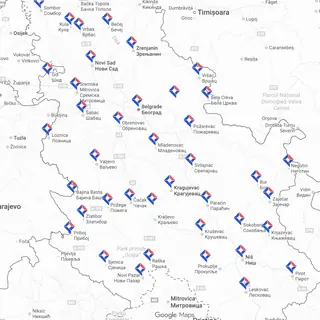
The nearest PaySpot location is probably around the corner
Exchange offices, vehicle inspection centres, agencies, kiosks and shops across Serbia carry the PaySpot sign. The locator shows every location and filters it by service.
Open the locatorHow the locator works
Open the locator for a service
- Daily cash deposit
- PaySpot NET
- International money transfer (RIA)
- Tax refund
- Vehicle registration loan
- Electronic money
- Betting deposits
The locator opens on payspot.rs.